Smart Living Products
ISDN2001/2002: Second Year Design Project
Independent Study 1
Real time Avatar Control from a Webcam on macOS: A Unity Integrated Approach
By CHU, Siu Pong
Abstract
This project aimed to build a system that controls a 3D game avatar in real time using only a standard webcam on a MacBook. The original plan was to use a state-of-the-art Human Mesh Recovery (HMR) model such as ROMP or ProxyCap to recover a full 3D body surface and drive a Unity character. However, all recent HMR models require NVIDIA CUDA GPUs, which are not available on Apple Silicon Macs. After a failed attempt with a Python SMPL-fitting server streaming quaternions over UDP, the final solution moved the entire pose-estimation pipeline inside Unity. By using the Unitynative package BlazePoseBarracuda (MediaPipe's pose detector running on Apple Metal) and Unity's Animation Rigging with Two-Bone IK, real-time full-body mirroring was achieved – including arm and leg tracking, body rotation, spine bending, and head turning. The system runs at 30 frames per second on a MacBook Pro, entirely within the Unity Editor. A projectile-kicking mini-game was also implemented to demonstrate interactive control inside a Unity scene. This work demonstrates a practical, Unity-focused alternative to CUDA-dependent HMR pipelines for real-time avatar animation.
1. Introduction
Motion-controlled gaming and virtual YouTubing (VTubing) are growing in popularity. Most existing solutions need depth cameras, expensive suits, or are limited to simple skeleton tracking that cannot capture full-body orientation or spine bending within a game engine. The goal of this project was to create a real-time avatar control system that works with a single RGB webcam, runs on a standard MacBook, and mirrors the user's full-body pose inside Unity – the most widely used game engine. A key requirement was that the entire system must function inside Unity, without external servers or GPU-specific code, so that it can be directly integrated into interactive applications built with Unity.

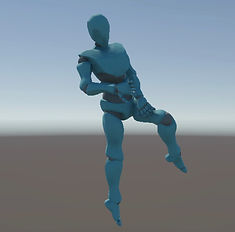


Fig. 1. Real-time full-body mirroring: the avatar (right) reproduces the user's pose captured by a standard MacBook webcam.
2. Background and Related Work
2.1 Human Mesh Recovery (HMR) Models
Recent deep-learning models such as ROMP [1], PyMAF [2], and SMPLify-X [8] can predict a full 3D human mesh from a single image. The most impressive example is ProxyCap [6], presented at CVPR 2024, which captures not only body pose but also global movement in world space. All these models, however, are built on PyTorch with NVIDIA CUDA acceleration. Apple Silicon Macs use a completely different GPU architecture (Metal Performance Shaders, MPS), which does not support many operations these models require. As a result, HMR inference on a Mac falls far below real time, typically taking hundreds of milliseconds per frame, making them unsuitable for a real-time Unity application.

Table 1. Compatibility of popular HMR models with NVIDIA CUDA vs. Apple Silicon MPS.
2.2 Existing Webcam-Based Avatar Systems
Several tools already allow avatar control via webcam, but each has a significant limitation for a Unityintegrated real-time system. VSeeFace runs only on Windows and focuses on facial expression and upper-body movement. It does not support full-body inverse kinematics (IK) or Unity integration. SystemAnimatorOnline [7] is a browser-based VTubing tool that uses MediaPipe. It drives MikuMikuDance (MMD) models, which use the PMX file format [10], and VRM avatars, a glTF2.0based 3D avatar file format standardised by the VRM Consortium [11]. Neither format is Unity's native Humanoid system, and the tool's internal pipeline cannot be customised for game interaction. Simple OpenPose or MediaPipe skeleton visualisers give joint positions but do not drive a Unity humanoid rig with correct limb lengths or body rotation. The common lesson from these tools is that pose estimation should happen inside the target environment – not in a separate Python process sending data over a network. This is particularly true when the target platform is Unity, which has robust built-in animation and IK systems.
3. First Attempt: Python SMPL Server with UDP
Following the original proposal, I built a Python server that performed the following steps each frame: capture an image from the webcam; detect 2D landmarks with MediaPipe Pose [3]; fit the SMPL body model to the landmarks using PyTorch L-BFGS optimisation; extract 24 local joint quaternions and the pelvis translation; and send the quaternions and translation as a JSON string over UDP to Unity. In Unity, I attempted to map these quaternions onto a humanoid avatar's bones.Several problems emerged. The quaternions are in a right-handed coordinate system, while Unity uses a left-handed one. Converting quaternions repeatedly produced twisted limbs that no single offset could f ix. The pelvis position from MediaPipe is hip-relative – it never moves from (0,0,0) in world space – so the avatar could not walk or jump. UDP networking added latency and jitter, and debugging the dual-system pipeline was extremely difficult. After weeks of trying to calibrate the rotations, it became clear that the dual-system SMPL approach was not viable on macOS, and that the only robust solution was to eliminate the external Python server entirely and perform all processing inside Unity.
4. Final System Design – A Fully Unity-Based Pipeline
4.1 Moving Pose Estimation into Unity
The solution was to use BlazePoseBarracuda [4], a Unity package that runs Google's MediaPipe pose detection natively inside the engine. It uses Unity's Barracuda inference library, which is accelerated by Apple's Metal GPU. The package outputs 33 world-space 3D landmarks (in metres) at 30 frames per second, with the hip centre at the origin. Because the package is a standard Unity asset, no external processes, network connections, or platform-specific compilations are required.
4.2 Driving the Avatar with Unity Animation Rigging and Inverse kinematics
Rather than predicting joint rotations, I placed Inverse kinematics(IK) target objects at the detected wrist and ankle positions. Unity's Animation Rigging package [5] provides Two-Bone IK constraints that automatically compute the shoulder, elbow, hip, and knee rotations so the hands and feet reach their targets. Inverse kinematics is the process of calculating the required joint rotations of a kinematic chain so that the end effector (e.g., the hand or foot) reaches a given target position [9]. Unity's Animation Rigging implements a fast, two-bone IK solver that is well-suited for real-time humanoid limb control. This leverages Unity's built-in skeletal animation system, meaning the avatar responds in exactly the same way as any other Unity humanoid character.
Four IK chains were set up for the left and right arms (shoulder to elbow to wrist) and the left and right legs (hip to knee to ankle). Each chain uses a Two-Bone IK constraint provided by the Animation Rigging package.

Fig. 2. Two-Bone IK constraint configured for the right arm in Unity's Animation Rigging.
4.3 Manual Limb Scaling
A human-operator's real arm length is almost never the same as the avatar's arm length. To prevent unnatural bending, I introduced two manual scale factors, s_arm (manualArmScale) and s_leg (manualLegScale), that stretch or shrink the distance from the base joint to the target. For each arm, let P_shoulder and P_wrist be the world-space positions of the shoulder and wrist landmarks. The wrist target position is then computed as T_wrist = P_shoulder + (s_arm) * (P_wrist - P_shoulder). Similarly, for each leg, let P_hip and P_ankle be the hip and ankle landmark positions. The ankle target is T_ankle = P_hip + (s_leg) * (P_ankle - P_hip). These values are tuned once by watching the avatar in Unity's Play Mode and adjusting sliders in the Inspector until the limbs are straight when the user stands straight.
4.4 Body Rotation and Spine Bending
The avatar's root rotation is determined from the shoulder and hip landmarks to produce natural turning and leaning. For body rotation (yaw), the horizontal direction of the shoulders is obtained by projecting the shoulder line onto the XZ plane. Let L_shoulder and R_shoulder be the left and right shoulder landmarks. Then v_horizontal = normalise( (x_R - x_L, 0, z_R - z_L) ). The body's forward direction is the cross product of the world up vector u = (0,1,0) with this horizontal vector: f_body = u × v_horizontal. This forward direction is applied to the avatar's root Transform.rotation using Unity's Quaternion.LookRotation(f_body, u). For spine bending, the spine direction is the vector from the hip centre to the shoulder centre. Let H_center = (L_hip + R_hip)/2 and S_center = (L_shoulder + R_shoulder)/2. The spine direction is d_spine = S_center - H_center. The avatar's root is rotated so that its local up axis aligns with d_spine while preserving the forward direction f_body as much as possible. This is implemented by first building a base rotation with forward f_body and up (0,1,0), then applying a FromToRotation from the base up to d_spine. These two rotations together make the avatar turn and bend in response to the user's torso movements, all computed from the landmark positions using only vector arithmetic.
4.5 Head Tracking
The head bone is rotated to look toward the nose landmark. Let P_head be the head bone position and P_nose be the nose landmark position. The look direction is d_look = P_nose - P_head. If d_look.z < 0 (the nose is behind the head, which can happen when facing the camera), the direction is flipped: d_look = -d_look. Then the head bone's rotation is set to Quaternion.LookRotation(d_look, Vector3.up). A small constant offset vector is added to P_nose before computing the direction to adjust the default head angle.
4.6 Hand and Foot Rotation Fixes
The IK only controls the positions of the hands and feet, not their rotations. By default, many avatars have hands pointing upward in T-pose. To fix this, the hand's rotation is set to match the forearm's rotation, plus a small Euler offset (tuned once in the Inspector). The same method is applied to the feet using the shin bone. All adjustments are done via Unity's Inspector, without any code changes.
4.7 Smoothing
All target positions are smoothed using an exponential moving average to remove jitter caused by landmark flickering. For a target position T_current computed from the current frame, the smoothed value T_smooth is updated as T_smooth = T_smooth + alpha * (T_current - T_smooth), where alpha = 1 - smoothing_weight. The smoothing weight is a public parameter adjustable in the Unity Inspector (typical value 0.3).
4.8 Summary of the Unity-Specific Architecture
The final pipeline runs entirely within Unity, starting from the webcam and passing through the BlazePoseDetecter to produce 33 world landmarks. From there, body rotation and spine bending are applied to the avatar root's Transform.rotation, limb IK targets drive the Two-Bone IK via the Animation Rigging package, and the head look direction is set on the head bone's Transform.rotation. Only 10 bones are actively controlled: the root (for body rotation/bending), the head, and the 8 limb bones that the IK solver updates. All other bones (spine, chest, neck, fingers) simply follow the hierarchy or stay in their rest pose. This design ensures that the system is fully embedded in Unity's update loop, with zero external dependencies at runtime.

Fig. 3. The complete Unity-based pipeline for real-time avatar control.
5. Demo: Projectile Kicking (Inside Unity)
To demonstrate interactive control within a real Unity scene, a simple projectile-kicking mini-game was added. A script spawns projectiles in front of the avatar at regular intervals. A small invisible collider attached to the avatar's right foot triggers an explosion when the foot makes contact with a projectile. This proves that the webcam-driven avatar can interact with other Unity objects – physics, prefabs, and custom scripts – in real time, with no additional sensors or external processing.
Vid. 1. Projectile-kicking demo: the avatar's foot triggers an explosion on contact.
6. Evaluation and Planned User Study
Although a full quantitative evaluation was not performed, the system was informally tested and found to be stable and responsive. Several evaluation metrics are planned for future work. Latency measurement will instrument the Unity code to log the time from webcam capture to avatar update, with an expected average under 20 ms. Jitter analysis will record wrist trajectory with and without smoothing to quantify the reduction in frame-to-frame noise. A user study will compare the IK-driven system against a baseline that directly maps landmarks to bone rotations without IK. Participants would perform simple tasks such as touching virtual targets and rate their sense of control and embodiment on a Likert scale.
7. Discussion and Lessons Learned
The biggest lesson of this project is that the choice of hardware dictates the entire system architecture. State-of-the-art computer vision models are often locked to specific GPU ecosystems (CUDA). Trying to force them onto Apple Silicon through emulation, ONNX conversion, or remote servers is impractical for real-time interactive applications. A second lesson is that a dual-system approach (Python server + Unity client) introduces fragility – networking jitter, serialisation overhead, and coordinate system mismatches make debugging extremely time-consuming. Moving the AI inference into Unity and using built-in IK and animation features proved far more robust and maintainable. Finally, the project demonstrates that a high-quality full-body avatar control system can be built entirely within Unity, using only a webcam and off-the-shelf Unity packages. No neural network training, no expensive sensors, and no platform-specific GPU code were required. This approach is directly reusable by any Unity developer on Apple Silicon.
8. Conclusion
I successfully built a real-time, full-body avatar control system that runs on a standard MacBook Pro using only the built-in webcam and Unity's native tools. The system mirrors arm and leg movements, body rotation, spine bending, and head turning. It can be used for VTubing, motion-based games, VR, f itness applications, and accessibility tools – all within the Unity ecosystem. Future improvements could include adding hand tracking (MediaPipe Hands), integrating the SMPL mesh from the Python server as a visual overlay (without using it for pose control), and implementing true global movement so the avatar can walk around the virtual space.
References
[1] H. Choi, G. Moon, J. Y. Chang, and K. M. Lee, "Beyond static features for temporally consistent 3D human pose and shape from a video," in Proc. IEEE/CVF Conf. Comput. Vis. Pattern Recognit. (CVPR), 2021, pp. 4684-4693.
https://arxiv.org/pdf/2011.08627v3
[2] Y. Zhang et al., "PyMAF: 3D human pose and shape regression with pyramidal mesh alignment feedback loop," in Proc. IEEE/CVF Int. Conf. Comput. Vis. (ICCV), 2021, pp. 11446-11456.
https://arxiv.org/pdf/2103.16507v3
[3] C. Lugaresi et al., "MediaPipe: A framework for building perception pipelines," 2019. [Online]. Available: arXiv:1906.08172.
https://arxiv.org/pdf/1906.08172
[4] "BlazePoseBarracuda," GitHub. [Online].
https://github.com/creativeIKEP/BlazePoseBarracuda
[5] "Unity Animation Rigging," Unity Technologies. [Online].
https://docs.unity3d.com/Packages/com.unity.animation.rigging@1.2/manual/index.html
[6] "ProxyCap: Real-time monocular full-body capture in world space," CVPR 2024. [Online].
https://zhangyux15.github.io/ProxyCapV2/
[7] "SystemAnimatorOnline," GitHub. [Online].
https://github.com/ButzYung/SystemAnimatorOnline
[8] G. Pavlakos et al., "Expressive body capture: 3D hands, face, and body from a single image," in Proc. IEEE/CVF Conf. Comput. Vis. Pattern Recognit. (CVPR), 2019, pp. 10975-10985.
https://arxiv.org/abs/1904.05866
[9] R. Parent, Computer Animation: Algorithms and Techniques, 3rd ed. Waltham, MA: Morgan Kaufmann, 2012, ch. 5.
[10] "PMX 2.0 file format," GitHub Gist. [Online].
https://gist.github.com/ulrikdamm/8274171
[11] VRM Consortium, "VRM - 3D Avatar File Format for VR," GitHub. [Online].
https://github.com/vrm-c/vrm.dev.en/blob/master/docs/index.md